
Shop Together with Shareable Grocery Lists
Create, share, and manage grocery lists with your family. Collaborate in real-time and make shopping easier for everyone.
Share Lists Instantly
Invite family members by email and start collaborating on your grocery lists immediately.
Role-Based Access
Assign roles like Owner, Editor, or Viewer to control who can modify your lists.
Manage Members
Easily add, remove, or change permissions for family members on your lists.
How Shared Grocery Lists Work
Create Your Grocery List
Start by creating a new grocery list or use an existing one. Add all the items you need for your shopping trip.
Invite Family Members
Tap the share button and enter your family members' email addresses. They'll receive an invitation to join your list.
Assign Roles & Permissions
Choose who can edit the list and who can only view it. You maintain full control as the owner.
Shop Together
Everyone can see updates in real-time. Check off items as you shop, and everyone stays synchronized.
Member Management & Roles

Manage who has access to your grocery lists
Owner
Full control over the list. Can add/remove members, change roles, and manage all aspects of the list.
Editor
Can add, edit, and remove items from the list. Perfect for family members who help with shopping.
Viewer
Can only view the list. Great for family members who just need to see what's needed.
Organize Your Lists
My Lists
All the grocery lists you've created. You're the owner and have full control. Set a default list for quick access.
- ✓Create unlimited grocery lists
- ✓Set one as your default list
- ✓Share with as many family members as needed
Shared with Me
Lists that other family members have shared with you. Your role determines what you can do.
- ✓See who owns each shared list
- ✓View your role and permissions
- ✓Collaborate in real-time
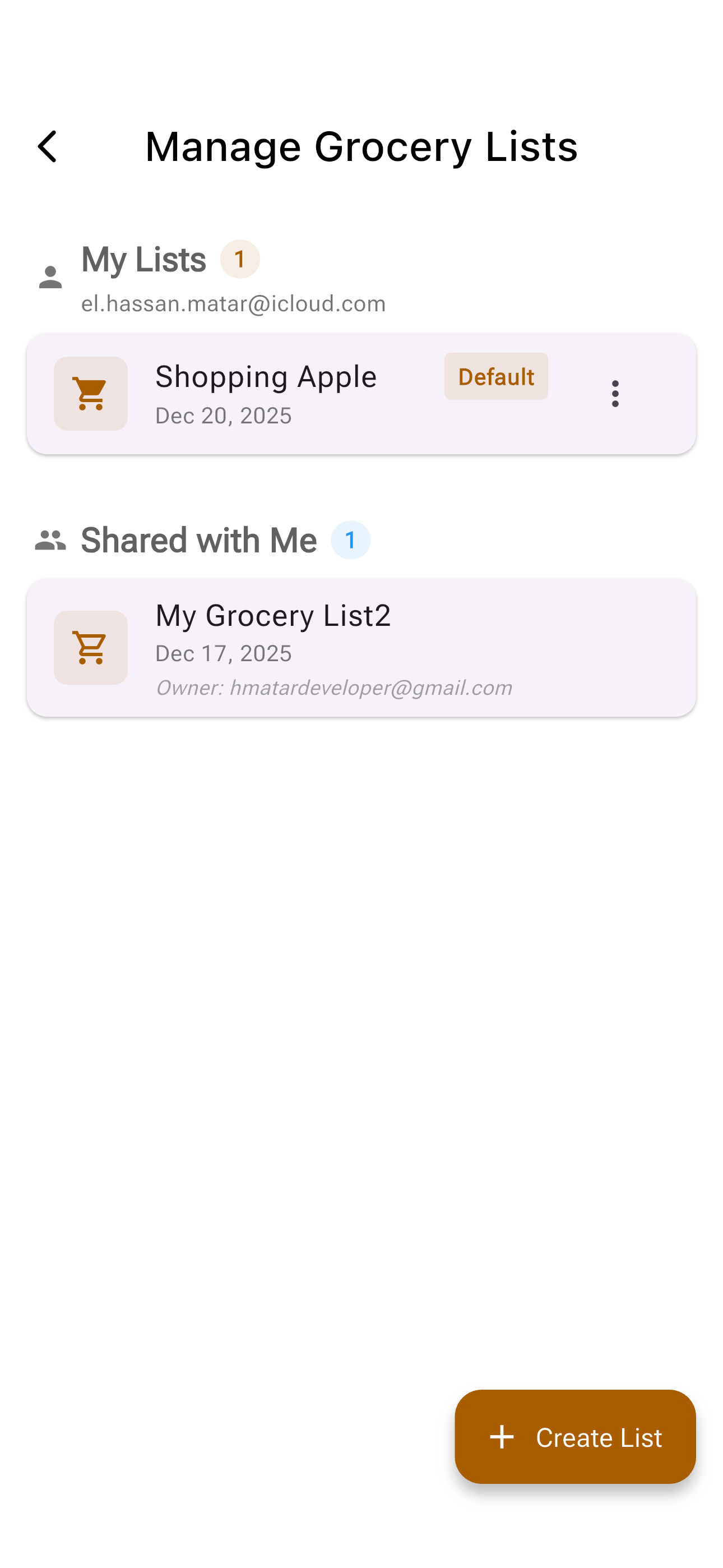
Easy overview of all your grocery lists
Track Who Purchased What
Stay Informed About Shopping Progress
See exactly who purchased each item from your shared grocery list. Perfect for families where multiple members shop at different times.
- ✓View who purchased each item in real-time
- ✓Track progress with item counts and status
- ✓See quantity information for each purchased item
- ✓Know when items are marked as purchased
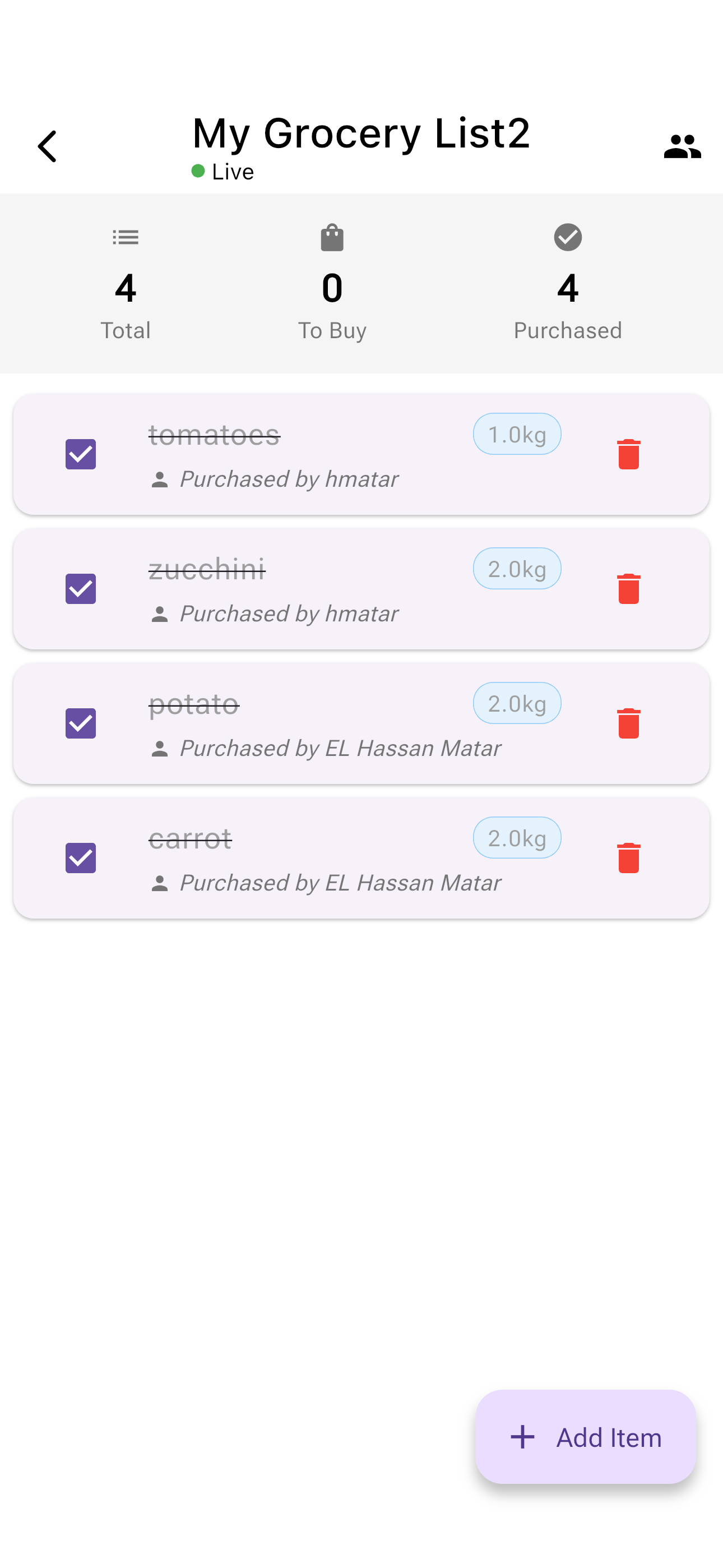
Know who purchased each item on your shared list
Why Use Shared Grocery Lists?
Better Coordination
No more duplicate purchases or forgotten items. Everyone stays on the same page.
Save Time
Anyone in the family can add items as needed. No need to communicate separately.
Real-Time Updates
Changes sync instantly. If someone adds milk, everyone sees it immediately.
Family Involvement
Get everyone involved in meal planning and shopping. Share the responsibility.
Privacy & Control
You decide who can access your lists and what they can do. Change permissions anytime.
Budget Together
Review the list together before shopping to stay within your family budget.
Perfect For...
👨👩👧👦 Busy Families
Parents and kids can all add items throughout the week. Whoever goes shopping has the complete list.
👫 Couples
Share a single list between partners. Either person can shop and both stay informed.
👵 Caring for Parents
Help elderly parents by managing their grocery lists remotely. Shop for them with confidence.
🏘️ Roommates
Coordinate shared household purchases. Track who's buying what for the group.
Start Shopping Together Today
Download Ingredify and create your first shared grocery list in minutes
Frequently Asked Questions
What is a shareable grocery list?
It is a grocery list that several people can open and edit on their own phones. In the Ingredify app you create a list, invite family members by email, and everyone sees the same list as it changes.
How many people can I share a list with?
You can share your grocery list with as many family members as you need. There's no limit to the number of people who can collaborate on a single list.
Can I have multiple shared lists?
Yes! You can create as many grocery lists as you want. For example, you might have one for weekly groceries, another for party planning, and a third for household items. Each list can have different members and permissions.
Can I see who bought an item?
Yes. When someone marks an item as purchased, the list shows who bought it, so two people do not buy the same thing.
What happens if I remove someone from my list?
When you remove a member from your list, they immediately lose access to it. The list will no longer appear in their 'Shared with Me' section, and they won't be able to view or edit it anymore.
Can I change someone's role after inviting them?
Absolutely! As the owner, you can change anyone's role at any time. For example, you can promote a Viewer to Editor, or demote an Editor to Viewer, based on your needs.
Do family members need an account to access shared lists?
Yes, family members will need to create a free Ingredify account using the email address you invited them with. This ensures secure access and proper synchronization across devices.
What if two people edit the list at the same time?
Changes sync between everyone's phones within moments, so everyone sees the most up-to-date version of the list.